PoixsDesk Project Documentation
📖 Project Introduction
PoixsDesk is a remote desktop/cloud computer system based on WebRTC technology, supporting remote access and control of Windows desktops through web browsers. The system implements low-latency screen sharing, audio/video transmission, and bidirectional input control functionality.
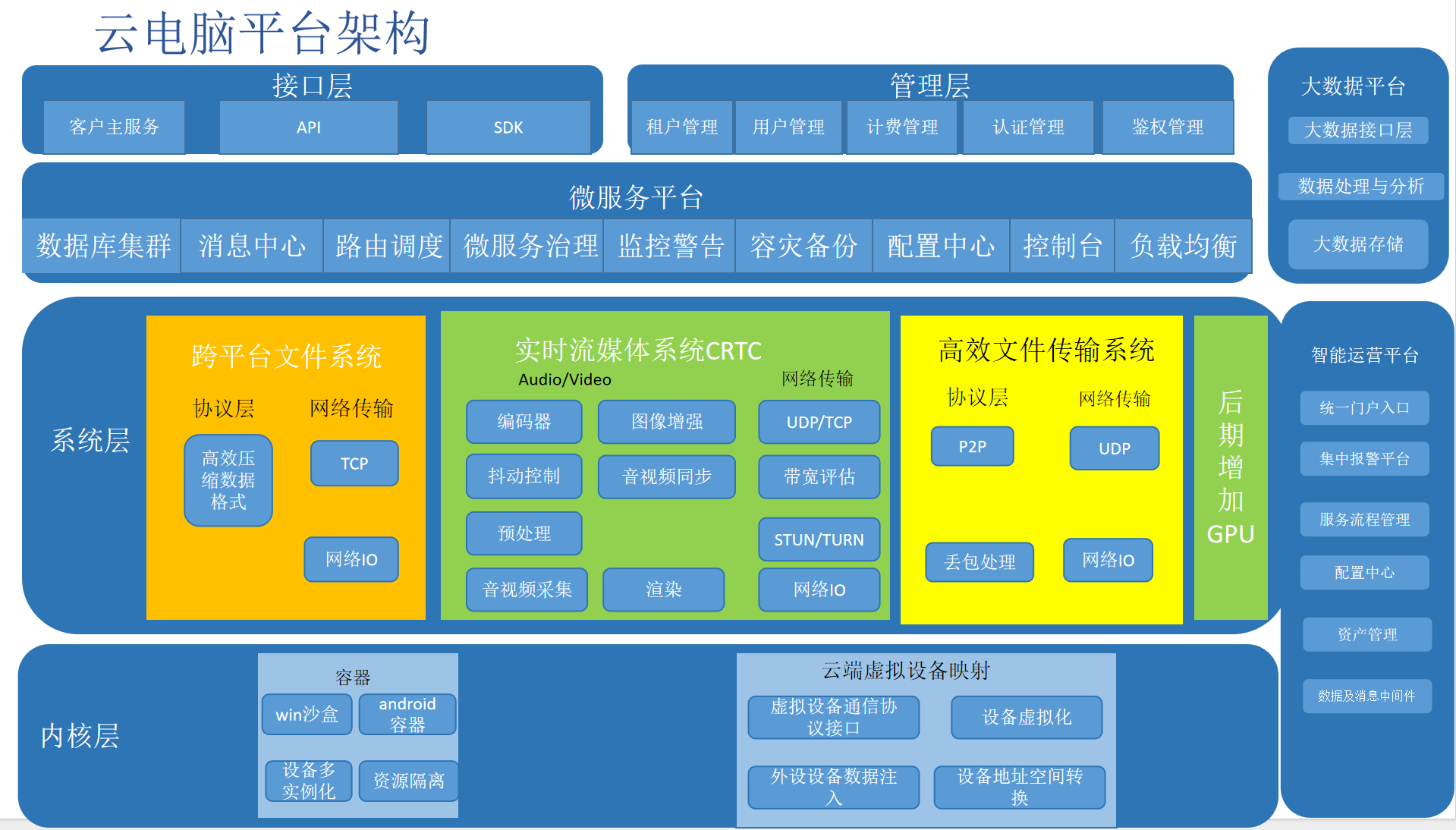
✨ Core Features
1. Real-time Screen Sharing
- Low-latency desktop streaming based on WebRTC
- Support for full-screen and window capture
- Automatic frame rate adjustment and bitrate control
2. Synchronized Audio/Video Transmission
- High-quality audio transmission (Opus codec)
- H.264/VP9 video encoding
- Audio/video synchronization processing
3. Remote Input Control
- Mouse movement and click control
- Keyboard input support
- Mouse wheel support
- Multi-key combination support
4. Bidirectional Data Transmission
- WebRTC Data Channel
- Reliable and unreliable transmission modes
- Support for binary and JSON format messages
5. WebSocket Signaling
- Signaling exchange based on WebSocket
- SDP exchange and ICE candidate collection
- Room management and user authentication
🏗️ System Architecture
Overall Architecture
┌──────────────┐         ┌──────────────┐
│  Web Client  │◄───────►│ Desktop App  │
│              │         │              │
│ - Browser    │         │ - Screen     │
│   Player     │         │   Capture    │
│ - Input Ctrl │         │ - A/V Encode │
└──────┬───────┘         └──────┬───────┘
       │                        │
       │   WebSocket Signaling  │
       │◄──────────────────────►│
       │                        │
       │   WebRTC Media Stream  │
       │◄──────────────────────►│
       │                        │
Module Composition
- libcommon: Common library containing RTC client, publisher, input device, and other core functionalities
- libdevice: Windows device control library responsible for input event sending
- PoixsDesk: Main program, entry point and lifecycle management
- Win: Windows GUI program providing graphical interface
- Tools: Tool programs including Windows service, etc.
- www: Web frontend, browser client interface
For detailed architecture documentation, please refer to ARCHITECTURE_EN.md
📦 Project Structure
PoixsDesk/
├── libcommon/              # Common library module
│   ├── client.h/cpp        # RTC client
│   ├── crtc_publisher.h/cpp # RTC publisher
│   ├── cinput_device.h/cpp # Input device management
│   ├── cdesktop_capture.h/cpp # Desktop capture
│   ├── cdata_channel.h/cpp # Data channel
│   └── ...
├── libdevice/              # Device control module
│   └── window/
│       ├── device.h/cpp    # Input device control
│       └── misc.h/cpp      # Helper functions
├── PoixsDesk/              # Main program
│   └── main.cpp            # Program entry point
├── Win/                    # Windows GUI program
├── Tools/                  # Tool programs
├── www/                    # Web frontend
└── build/                  # Build directory
🚀 Quick Start
Requirements
- Operating System: Windows 10/11
- Development Environment: Visual Studio 2017 or higher
- CMake: Version 3.8 or higher
- WebRTC: Requires self-compilation of Google WebRTC source code
Build Steps
- Clone the repository
git clone <repository_url> cd PoixsDesk - Prepare WebRTC dependencies
- Download and compile Google WebRTC source code
- Configure WebRTC path in CMakeLists.txt
- Configure CMake
mkdir build cd build cmake .. -DWebRTC_ROOT=D:/Work/webrtc_google/src - Build the project
cmake --build . --config Release - Run the program
./PoixsDesk/PoixsDesk.exe ws://localhost:8080/rtc
Runtime Parameters
ws://localhost:8080/rtc: WebSocket signaling server address
📖 Usage Instructions
Desktop Client Configuration
- Start the desktop application
PoixsDesk.exe ws://your-signaling-server/rtc - The program will automatically
- Connect to the signaling server
- Create WebRTC connection
- Start capturing desktop and audio
- Wait for client connections
Web Client Usage
- Open browser
- Visit
http://your-server/player.html
- Visit
- Connect to desktop
- Enter room name and username
- Click connect button
- Remote control
- Use mouse for clicking and moving
- Use keyboard for input
- Use mouse wheel for scrolling
Windows Service Mode
You can run in Windows service mode for auto-start on boot:
# Install service
PoisxDeskService.exe install

# Start service
PoisxDeskService.exe start

# Stop service
PoisxDeskService.exe stop
🔧 Configuration
Video Encoding Configuration
In crtc_publisher, you can configure:
- Encoder: H.264 or VP9
- Resolution: Support multiple resolutions
- Frame Rate: Adjustable frame rate limit
- Bitrate: Configurable target bitrate
Audio Encoding Configuration
- Encoder: Opus (default) or G.711
- Sample Rate: 48kHz (default)
- Channels: Stereo or mono
Network Configuration
- ICE Servers: Configure STUN/TURN servers in SDP
- Transport Mode: UDP (default) or TCP
- Data Channel: Reliable or unreliable transmission
📝 API Documentation
RTC Client API
Initialize Client
chen::crtc_client client;
client.init(0);  // gpu_index: GPU index
client.Loop("ws://localhost:8080/rtc");  // Connect to signaling server
Client State
enum ERtc_Type {
    ERtc_None,              // Not initialized
    ERtc_WebSocket_Init,    // WebSocket initializing
    ERtc_WebSocket,         // WebSocket connected
    ERtc_WebSocket_Wait,    // Waiting for response
    ERtc_Destory,           // Destroying
    ERtc_Exit               // Exiting
};
Input Device API
Mouse Control
// Absolute mouse movement
chen::abs_mouse(event, x, y);

// Relative mouse movement
chen::move_mouse(event, deltaX, deltaY);

// Mouse button
chen::button_mouse(event, x, y, button, release);
// button: 0=left, 1=middle, 2=right, 3+=extended
Keyboard Control
// Key press/release
chen::keyboard_update(event, vk_code, release, flags);
// vk_code: virtual key code
// release: true=release, false=press
🔍 Troubleshooting
Common Issues
1. Input Events Invalid
Problem: Mouse or keyboard input cannot control remote desktop
Solutions:
- Check if the program is running with administrator privileges
- Confirm if desktop synchronization is successful
- Check if input desktop handle is valid
2. Video Not Displaying
Problem: Web client cannot see desktop screen
Solutions:
- Check if SDP exchange is successful
- Confirm if ICE connection is established
- Check firewall settings
- View browser console error messages
3. High Latency
Problem: Remote operations have noticeable delay
Solutions:
- Check if network bandwidth is sufficient
- Reduce video resolution and frame rate
- Use lower encoding bitrate
- Check system resource usage
4. Audio Issues
Problem: No sound or audio stuttering
Solutions:
- Check if audio device is working properly
- Confirm audio encoder configuration
- Check network packet loss
Debug Tools
- Log Output: Program outputs detailed log information
- WebRTC Logs: Can enable WebRTC internal logs
- Network Capture: Use Wireshark to analyze network traffic
🔒 Security Recommendations
Authentication and Authorization
- Implement user authentication mechanism
- Add access control list (ACL)
- Use TLS to encrypt WebSocket connections
Data Encryption
- SRTP: Media stream encryption (built-in)
- DTLS: Data channel encryption (built-in)
- TLS: Signaling channel encryption (recommended)
Input Validation
- Validate input event coordinate ranges
- Limit input event frequency
- Implement blacklist mechanism
🤝 Contributing
Code Standards
- Use C++17 standard
- Follow the existing code style of the project
- Add detailed comments (Doxygen format)
- Ensure code passes compilation and tests
Contribution Process
- Fork the project
- Create feature branch
- Commit changes
- Create Pull Request
📄 License
Please see the LICENSE file for detailed license information.
👥 Author
- chensong - Project creator and maintainer
🙏 Acknowledgments
- Google WebRTC team
- All contributors and users
📚 Related Documentation
- Architecture Documentation - Detailed system architecture
- Chinese Documentation - Chinese documentation
- API Documentation - API reference (to be added)
🐛 Issue Reporting
If you encounter problems or have suggestions, please report through:
- Submit an Issue
- Send an email
- Create a Pull Request
🔮 Future Plans
Feature Enhancements
- Support multiple users simultaneously
- Implement file transfer functionality
- Support clipboard synchronization
- Implement remote printing
Platform Extensions
- Linux desktop client support
- macOS desktop client support
- Mobile client (iOS/Android)
Performance Optimization
- GPU accelerated encoding
- Adaptive bitrate algorithm optimization
- Network transmission optimization
Last Updated: 2025-01-XX
Version: 1.0